Region of Interest
Regions of interest (ROIs) are areas of an image, which can be used as input into subsequent data analysis. ROIs can be defined manually, as explained in this page, or automatically through processing such as clustering.
Feature List
Overview
The ROI panel can be found on the right on the main interface (number 1 in the image below).

- Region of interest list
- Save region of interest list
- Load region of interest list
- View statistics on ROI
- Add/edit/delete ROIs
Generate ROI
To create an ROI manually, the Edit button on the main interface in the ROI panel must be clicked. This then opens the ROI List Editor, shown below, displaying the ion image which was previously active in the main interface.
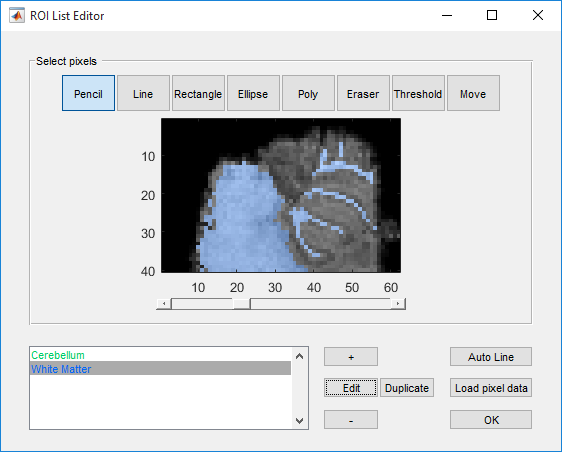
To create a new ROI, first click the + button, and then in the new window, select an ROI name and colour and then click OK. This then adds the new ROI to the list (bottom left in the interface). The highlighted ROI is then displayed on top of the image, and any selected tool (defined below) can then be applied directly to the image by clicking and/or dragging.
- Pencil
- Assign individual pixels to the ROI.
- Line
- Assign all pixels which fall along a line drawn by the user to the ROI.
- Rectangle
- Assign all pixels which fall within a rectangle drawn by the user to the ROI.
- Ellipse
- Assign all pixels which fall within an ellipse drawn by the user.
- Poly
- Define an arbitrary shape .
- Eraser
- Toggle button. When active, use any shape to define an area to remove from the current region of interest. When deactivated, areas are added to the ROI.
- Threshold
- Assign all pixels … (see Threshold for more details).
- Move
- Allows dragging of the ROI to a new location.